Azure Security: Secure Score and Recommendations
Overview
The Spotto Security page is a focused view of Azure secure score and the security recommendations that move it. It’s built for the recurring problem of “we have a lot of findings — which fixes actually change our posture?”
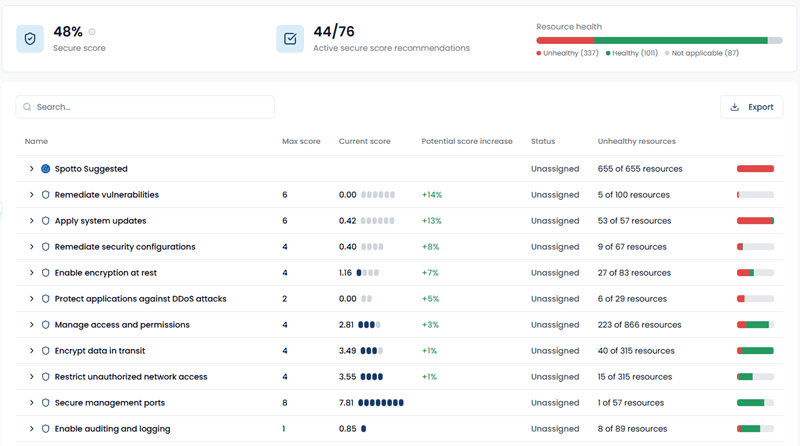
Feature overview
Security in Spotto combines:
- Your subscription secure score (from Microsoft Defender for Cloud / Azure Security Center)
- Security control groups (max score, current score, and potential score increase)
- The recommendations inside each control, so you can prioritize the fixes with the most impact
- A Spotto Suggested section for Spotto security best-practice recommendations that don’t map to a Defender control (but still matter)
Secure score itself is a percentage: points earned across all security controls divided by the points available for the subscription. Clearing higher-impact controls moves it faster than grinding through low-value fixes.
Why use this? (Jobs, pains, gains)
Jobs to be done
- When I’m improving security posture, I want to rank the fixes that raise secure score the most, so I can ship meaningful improvements (not just close tickets).
- When I’m working subscription-by-subscription, I want a single control-oriented view, so I can quickly identify the weakest controls and the resources driving them.
- When leadership asks “are we safer?”, I want a percentage and a backlog I can point at, so progress isn’t a vibes-based conversation.
Common pains
- Secure score is easy to see; it’s harder to see which work items actually move it.
- Recommendation lists are noisy, and it’s not obvious which ones are part of the same control.
- Platform/Security teams need to translate provider guidance into “what do we fix first?” priorities.
What you gain
- A control-group view sorted by potential score increase, so “highest impact first” is the default.
- Quick signals for progress: Completed vs Unassigned and resource health (Healthy / Unhealthy / Not applicable).
- A separate Spotto Suggested group for best-practice items that improve hygiene even when they don’t change secure score.
Turn the evidence into a decision
Select the labelled briefcase Business Value button beside Notes and the subscription selector. The brief combines live Secure Score, recommendation, resource, and control-impact facts with a priority body of work and a decision prompt.
The facts, expected change, priority work, and stakeholder questions remain live and are not written by AI. If you can manage Company Notes and use Ask Spotto, select Generate to tailor only the headline, outcomes, cost of delay, and decision using authorized context and strategy. The draft is saved for the exact scope. Select Clear beside Generate to remove that saved draft and return immediately to the standard Business Value narrative; this does not delete Customer Context or change live evidence. If its evidence changes, Spotto warns you to regenerate and review it before presenting. Above 100 subscriptions, the live curated brief remains available but tailoring is disabled.
Current position and priority work
Start with the Secure Score as posture evidence, not a breach probability. The priority list names up to two controls with the greatest potential score increase and shows their affected-resource and recommendation counts, so the first package is more specific than "work the backlog."
Expected change
When scored controls are available, the brief shows current Secure Score → projected Secure Score for the named package. The projection adds the existing potential-score values, caps the result at 100%, and becomes real only after Microsoft Azure verifies the controls as completed. It is not a delivery date, guaranteed security outcome, or estimate of breach likelihood.
Include a resource-tagging work package that identifies data classification, business criticality, service ownership, environment, and cost allocation. Store classification labels, never sensitive content, in tags. A consistent standard helps governance, security operations, and billing teams identify the same priority services instead of maintaining separate spreadsheets that disagree at exactly the wrong moment.
Use Continue in Spotto to open the company's Tags page for that standard or Trend Tracker with the current subscription scope to follow Secure Score movement over time.
Business outcomes
Security work reduces the likelihood and operational impact of unauthorized access, service interruption, and data exposure. It also gives customers and auditors clearer evidence that material gaps are understood and being managed.
Cost of delay
If affected resources are internet-facing, business-critical, or hold sensitive data, unresolved controls can contribute to incident response cost, customer notification, regulatory scrutiny, and reputational damage. These are conditional consequences, not predictions. Spotto does not invent a breach-cost figure; quantify financial exposure only when verified customer context supports it.
Decision required
Seek agreement on the target security posture, the first remediation package, its accountable owner, and the date progress will be reviewed.
Validate with stakeholders
When you can manage Company Notes, select any question in the portal to retain the answer in the relevant Customer Context note.
- Which affected workloads are customer-facing or process sensitive data, and how are they identified through resource tags?
- Which contractual, regulatory, cyber-insurance, or internal controls apply?
- What service dependencies and change windows constrain remediation?
Key capabilities
Where to find it
In the Spotto Portal, open your company and navigate to Security -> Posture -> Security.
Select subscriptions to scope the view
Use the subscription selector at the top of the page to choose one or more subscriptions. Summary and control data are aggregated across the selected, ready subscriptions while preserving subscription-scoped evidence in the detailed results.
If no subscription is selected, the page stays empty until you pick one.
See secure score, backlog size, and resource health
The summary cards show:
- Secure score (0–100%)
- Open Recommendations (the count of active secure score recommendations in the current selection)
- Assessment Status distribution (Action Needed, Healthy, and Not Applicable)
Prioritize by security control impact
The main table groups recommendations by security control. Each group includes:
- Max score and current score
- Potential score increase (what you’d gain by clearing the control’s remaining findings)
- Unhealthy resources count, plus a health bar for quick triage
Groups are sorted by potential score increase (highest first), so you can start with the work that has the biggest material impact.
Expand a control to see the recommendations inside it
Click a security control group row to expand it and see the individual recommendations. Click a recommendation name to open its Recommendation Details page (so you can review affected resources, remediation guidance, and sharing/ticketing actions).
Spotto security best practices (Spotto Suggested)
Not every useful security improvement maps cleanly to a Defender control. The Spotto Suggested group is where Spotto includes security best-practice recommendations that:
- May not directly increase secure score
- Still reduce risk and improve baseline hygiene
- Use the same recommendations workflow as everything else (details, affected resources, and sharing)
Search and export
- Search the table by recommendation name or description.
- Export the current control list to CSV (this export is control-level summary data, not the expanded recommendation rows).
Technical reference (what the Security page uses)
| Component | Details |
|---|---|
| Inputs | Microsoft Defender for Cloud secure score + control scoring, Azure Advisor / Defender recommendations and security assessment statuses, and Spotto Suggested best-practice recommendations. |
| Outputs | Summary cards, a grouped control table (expandable into recommendations), navigation into recommendation detail pages, and CSV export. |
| Defaults | Aggregates ready selected subscriptions. Control groups are sorted by potential score increase (highest first), with Spotto Suggested pinned at the top. |
How it differs from Azure-native security views
Defender for Cloud is the source of truth for secure score and control scoring, but Spotto optimizes for the operating question: “what should we fix first, and which resources are involved?”
Spotto’s Security page focuses on:
- Control-group prioritization by potential score increase
- A clear split between secure-score-driving work vs best-practice work (Spotto Suggested)
- One-click drill-in to the same recommendation detail workflow you use elsewhere in Spotto
How it works (high level)
- You select one or more subscriptions.
- Spotto loads security recommendations and available control scoring details for each ready selected subscription.
- Recommendations are grouped under their matching security controls; additional best-practice items appear under Spotto Suggested.
- Each control shows scoring and resource health rollups so you can prioritize remediation work.
Troubleshooting
The page is empty / I don’t see any security data
What you’re seeing: Empty state or “No security recommendations found”. Likely causes:
- No subscription selected.
- The subscription is still onboarding/syncing (not “ready” yet).
- The subscription has limited Defender for Cloud coverage, so fewer controls are populated.
How to fix:
- Select a subscription in the subscription picker.
- If the subscription is still syncing, wait for ingestion to complete and refresh.
- Confirm Defender for Cloud is enabled for the subscription if you expect secure score data.
Spotto Suggested items don’t change secure score
What you’re seeing: Best-practice recommendations are listed, but max/current score fields are blank. Likely cause: Spotto Suggested recommendations don’t map to Defender controls, so they don’t contribute to secure score scoring. How to fix: Treat these as “hygiene improvements” rather than secure-score levers; prioritize them based on risk and operational context.
A selected subscription has no security results
What you’re seeing: One or more selected subscriptions do not contribute security results. Why: The subscription may not be ready, its recommendation data may be unavailable, or its security collection may have failed. How to fix: Review the partial-failure notice, confirm the subscription is ready, and retry after its data collection completes. Use Trend Tracker when you need historical comparison rather than the current posture.
Looking to enhance your cloud setup for cost efficiency, performance, reliability, or security?
Talk to a cloud specialist. Email us or schedule a 30-minute consultation and let's optimize your cloud environment together.
Book a Free Consultation