Tickets: Integration Ticket History
Overview
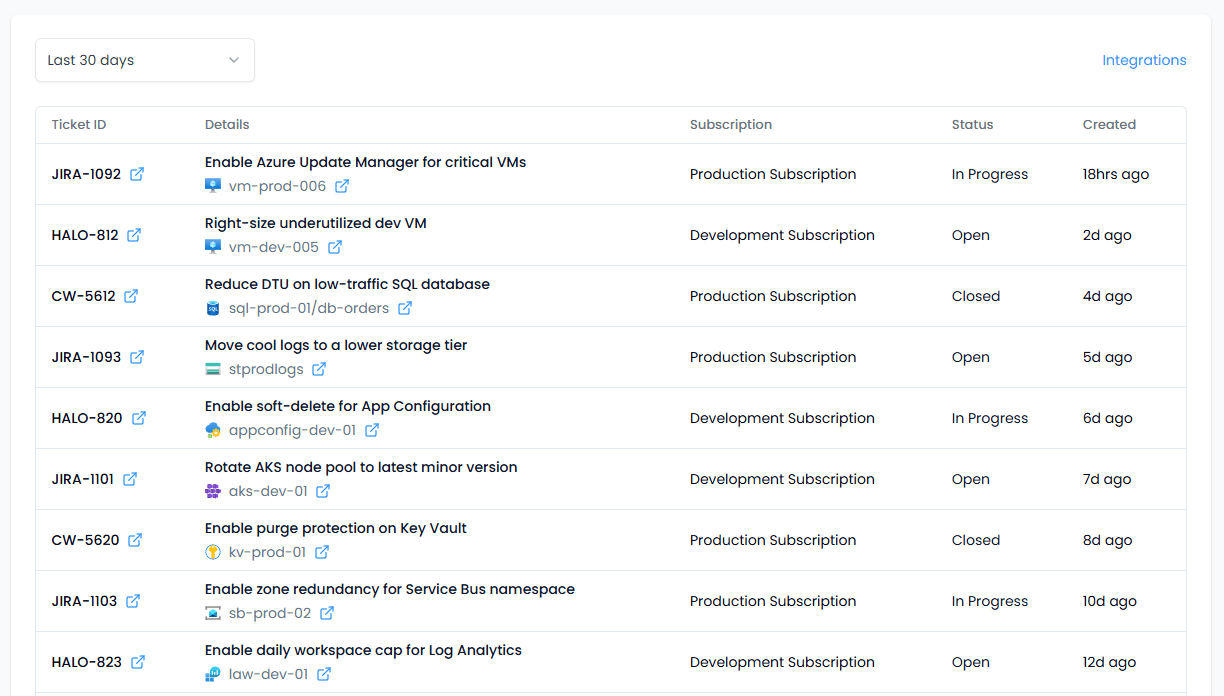
The Tickets page shows tickets Spotto creates when you share a recommendation to Jira, Autotask, Halo, or ConnectWise. It gives you one place to confirm creation, review context, and jump back to the provider or the original recommendation.
What you can do
- Filter tickets to the last 7, 30, 90, or 180 days. The default is 30 days.
- View the provider, ticket ID, creation time, subscription, and status.
- Open the ticket in the provider or open the linked recommendation in Spotto.
Where to find it
In the Spotto Portal, go to Tasks -> Review -> Tickets.
How tickets get here
Tickets appear when a user shares a recommendation to a supported ticketing integration. Only tickets recorded by Spotto are listed here; tickets created manually in the provider are not included.
Status and refresh behavior
Spotto queries the provider to display the latest ticket status. Status values are normalized so you see a consistent category (for example Open, In Progress, Closed, or Unknown). If a provider does not supply a category or cannot be reached, the status may show Unknown.
Troubleshooting
I don’t see any tickets
What you’re seeing: The list is empty or missing tickets you expect.
Likely causes:
- No recommendations have been shared to a ticketing provider in the selected date range.
- You’re in the wrong company context.
- The recommendation was shared through a channel that does not create a tracked ticket. How to fix:
- Widen the date range and refresh.
- Confirm you’re in the correct company/customer context.
- Share a test recommendation to confirm ticket creation.
Status shows Unknown
What you’re seeing: Ticket status is Unknown.
Likely causes:
- The provider does not supply a category for the status.
- The provider API could not be reached with the stored credentials. How to fix:
- Confirm the integration credentials are still valid in Connectors -> PSA Integration.
- Retry later if the provider is experiencing an outage.